Built for anyone who wants to see their next haircut on their own face first, and for barbers to show their clients the cut before the chair.
Watch it happen — 30 seconds
Messy hair, one tap on the phone, and he walks back through the door with the fresh cut already on his head. That’s the whole idea — watch the ad, then try the live sample right underneath it.
Try it right here
This is the working sample, live on this website — for him, for her, for beards and for hair colour. His and her hair colours share one bubble — tap either side of the slash — and right beside it is the Couples bubble, for the two of you together in one picture. Tap a choice right below and this preview at the top changes in place — no scrolling down to find it. Tap a style, flip through every angle, tap Before / After right on the preview and slide it — on any picture you’re looking at, your own photo included — and share the look — exactly how it will feel on your phone when the own-photo version opens. And it isn’t just this preview: every sample picture on the page — his styles, her styles, the beards, the hair colours and every angle picture too, sides, three-quarter and back included — has its own before & after built in. Drag the yellow line on any picture to slide between its before and after right there on that card — slide right and the After takes over, slide left and the Before comes back, the same way on every slider on the page. Take your own picture and every one of those pictures turns into your picture — with the same slider on each one, your original photo on one side and that look on the other.
Showing the men’s live preview — right here at the top. Tap Her, Beards, Hair Colour Him / Her, or Couples and this same preview changes in place.


Pick a style
See the scissors button at the bottom center of the preview? Push it to take your own picture right there — your photo drops into the live preview and every sample picture below turns into your picture, so you see your own face in every spot. When the own-photo engine opens, each style gets re-drawn on that photo — that re-draw isn’t connected yet. And the Before / After button sits right on the preview — tap it and slide it on any picture you’re looking at, your own photo included.
Your photo stays yours — promise
Your photo stays yours. The pictures on this page are fictional sample faces — nobody’s real selfie is on display here.
When the own-photo version opens, your photo is used to make your hairstyle pictures — that’s what it’s for. It isn’t sold, and it isn’t posted anywhere for other people to see.
Nobody here takes your pictures. Your photo is private: never sold, never posted, never handed to anyone else. The only way one of your looks ever gets shared is if you share it, from your own phone.
One Free Try
First try free — then $9.99 for 100 credits · No subscription · Credits never expire
Right here is where the photo engine will sit. When the own-photo try-on opens, upload your photo, pick a style, and your first try is free — see it on your own face before you pay anything. No card needed for that first try.
One free try per person — closing the browser won’t reset it
Good question, and it’s locked down on purpose — because every try-on costs real money to run. Your free try isn’t tied to whether this tab is open. It’s tied to you.
- Your email is the key. When you claim the free try, you enter your email and we check it on our end before your photo runs. If that email has already used its free try, the free one doesn’t run again.
- Device & connection are the backup. We also remember the device and connection you used it on, so switching browsers or reopening the site on the same computer doesn’t hand out a second free try either.
- Come back anytime — your record stays. Close the laptop, come back tomorrow, or switch from computer to phone with the same email: it’s still one free try total. After that, each try is just 1 credit from a pack.
Already used yours? No hard feelings and no lockout from the site — browsing the samples stays free forever, and a $9.99 pack gives you 100 more tries that never expire.
Like what you see? After that it’s $9.99 for a pack of 100 credits. 1 credit = 1 try-on — one photo in, one new look out. And your credits never expire — buy a pack once and use them whenever you’re ready, next week or next year. Browsing the sample looks on this site is always free — a credit is only used when you run your own photo. When your credits run out, the try-on simply pauses until you buy another pack. Your pack is paid up front, so there’s no running bill and no surprise charges — and no subscription required.
Honest note: the own-photo try-on isn’t connected yet — everything you can tap today is the live sample above, and browsing those samples is free. The one free try and the 100-credit packs apply the moment the own-photo try-on opens.
See the cut on your own face first.
Take one photo, tap a hairstyle, and watch your real face redrawn wearing it — front, both sides, three-quarter, and the back of your head. Then walk into the barber or the salon, show your phone, and say: “This is what I want.” The live sample at the top of this page is ready today — trying it on your own photo is coming soon, and the launch list at the bottom is how you’ll hear first.
Try It Now First try FREE only Your photo stays yours — promise


That’s the whole idea in one picture: the same face, before and after — so there’s no guessing in the chair. And it works the same for her — her sample is right below his.
Demo — Featured Local Barber idea
Russel, here’s the idea mocked up so you can see it before deciding anything: a simple spot for a hometown Angola shop — The CombOver Barbershop — using only their name, their address, and their own published tagline, linked back to their own website. Nothing here is a customer review, and nothing here says they endorse Barber Breakthrough.
The CombOver Barbershop
1015 N Wayne St, Angola, IN 46703
In this demo, the shop is shown in their own words — the tagline on the right is theirs, from their own website, credited to them and linked straight back to them. For their hours, barbers and booking, their site is the place to check, since schedules can change week to week.
Call the shop: (260) 350-8941
“Classic Cuts, Modern Style”
— The CombOver Barbershop, Angola, Indiana
That’s their tagline for their own shop — not a review of Barber Breakthrough, not a customer quote, and not an endorsement of Barber Breakthrough by The CombOver. It appears here only inside this demo preview.
Tagline as published on thecomboverbarbershop.com. Barber Breakthrough is a separate hometown project, not part of the shop — and Russel has not yet decided whether to ask the shop for permission to run a spot like this for real.
Better together
Don’t just fix yourself up — do it together. Tap His & Hers, he takes his picture first, then she takes hers, and Barber Breakthrough puts you both together in one picture — his new cut and her new style side by side, before either of you sits down.
Tap “His & Hers”
That’s the button couples will tap in the app. Then it walks you through it in order — his picture, her picture, then one together picture. Try the sample walkthrough below:
Honest note: This is how His & Hers will work in the full version. The walkthrough above uses the fictional sample couple already on this page — visitors’ own photos are Coming Soon, the live try-on for your own pictures isn’t connected yet, so there’s no upload to try here today.
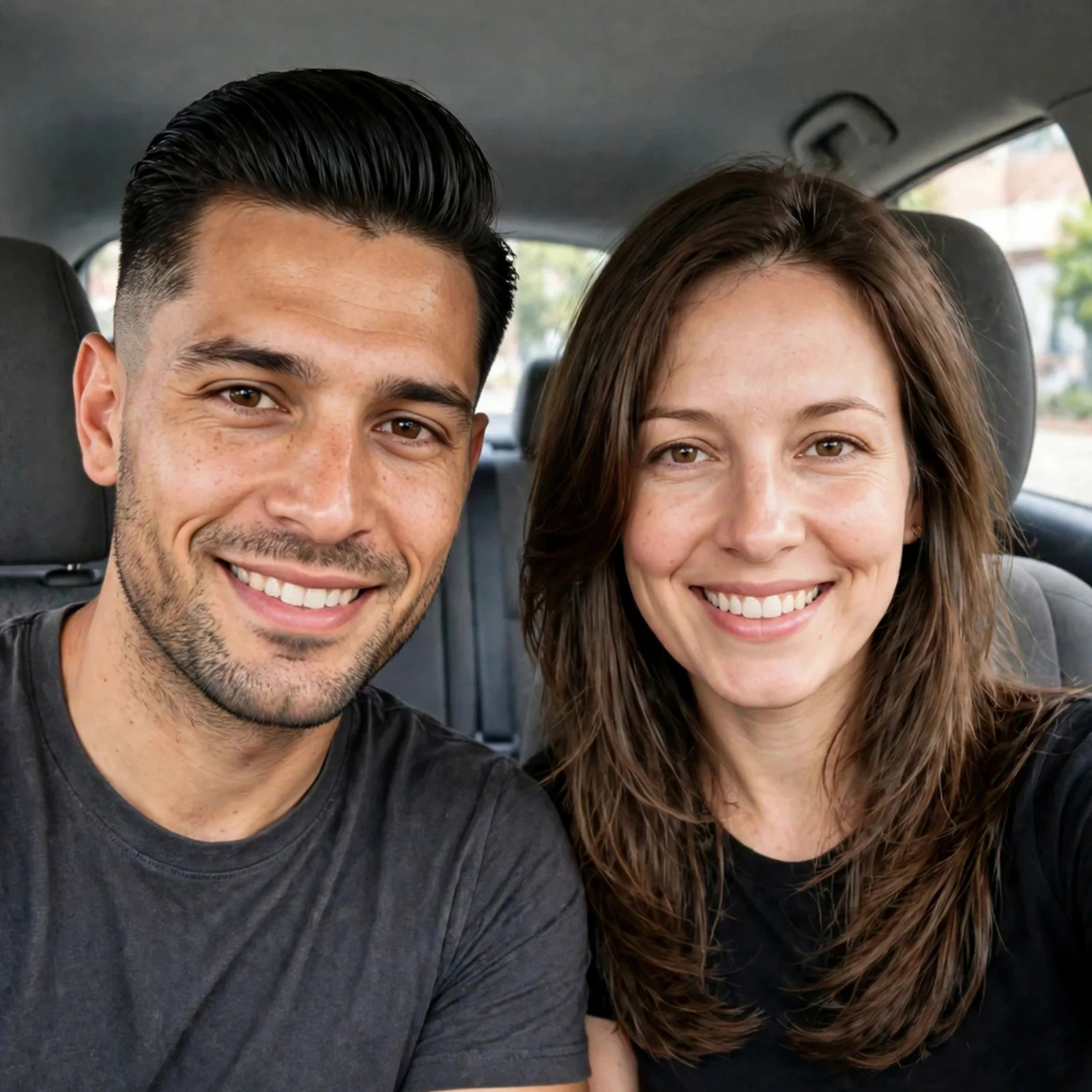

One picture, both of you
In the full version, you use the His & Hers option above: he takes his photo first and picks his cut, then she takes her photo and picks her style — and Barber Breakthrough puts you both together in one combined picture, like this sample. No imagining how you’ll look standing next to each other. You’re looking at it.
That’s the same couple as the solo samples — his face from For Him, hers from For Her — together in one frame this time.
How it works
Take your picture
One selfie is all it takes. Just as easy as snapping a photo — no setup, no explaining anything to anybody.
Tap a style
The styles sit in a row right underneath your photo. Tap one and your picture re-renders in that cut — your face, your head, wearing it for real.
Show your barber or stylist
Walk in with the photo and your barber or stylist card. Five views — front, left, right, three-quarter and back — so the cut matches the picture from every side.
Get a photo that works
When the own-photo version opens, the picture you start with decides how clean your results look. Four simple things make the biggest difference — worth knowing before launch day.
Face the light
Stand facing a window or a bright room light, not with the light behind you. Even light on your face — no harsh shadow across one side.
Look straight at the camera
Hold the phone at eye level and look right into it, head level — not tilted up, down, or turned. That straight-on shot is what every angle is built from.
Show your whole head
Keep the top of your head and both ears in the frame, with a little space around you. Hats off, and long hair pulled back off the face for the starting shot.
Keep it simple
A plain wall behind you, glasses off if you can, and a normal expression — no filters. The plainer the photo, the more the new style stands out.
The starting lineup
Twelve styles to start — six cuts for him, six styles for her — every one shown on the same real face for each sample, so you can compare them honestly, side by side. Every card has its own before & after slider — drag the yellow line on any picture.
For him — six cuts
For her — six styles
New — Beards are in
A haircut is only half the look. Now the beard gets the same treatment: six beard styles for him — to match the six men’s cuts — every one shown the straightforward way a barber needs to see it: straight-on from the front, under the chin, the right side of the face, and the left side of the face. Tap a beard, flip through its four views, and the beard card underneath tells your barber exactly what to do.

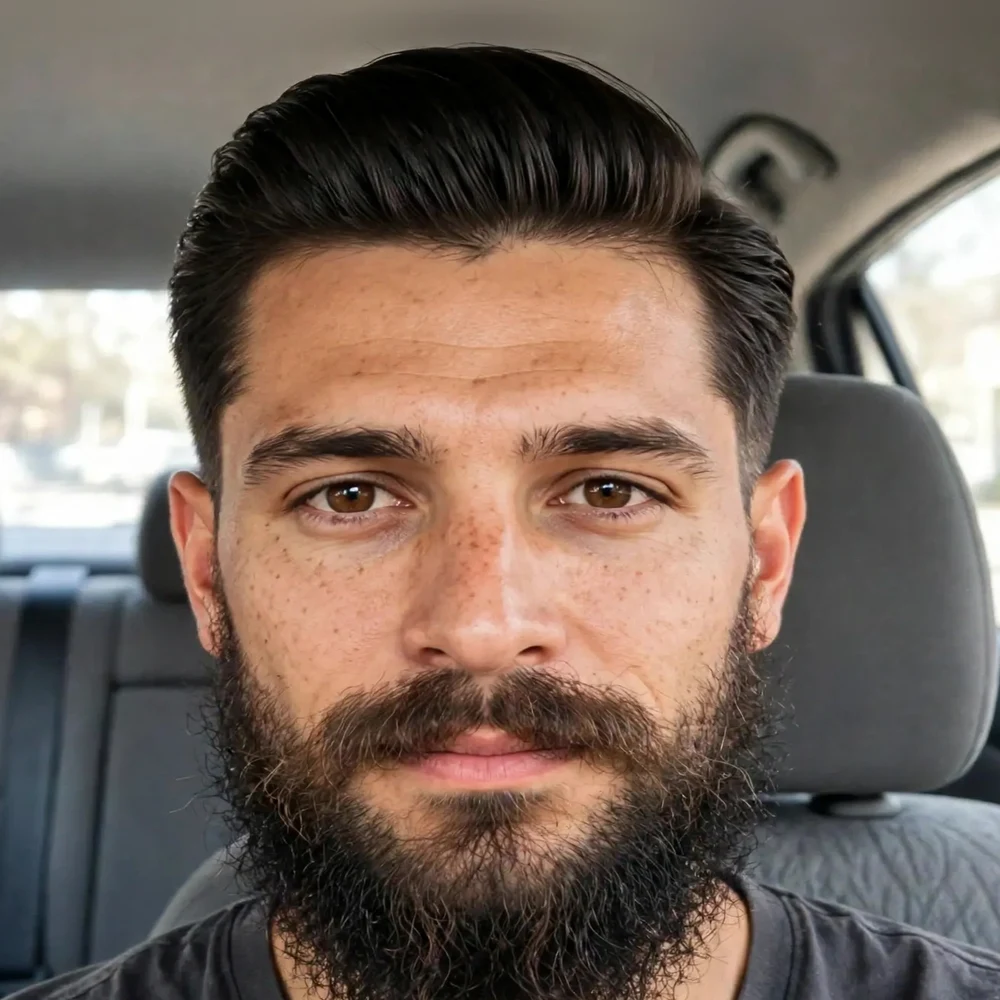
Pick a beard — six styles
Pair any beard with any of the six men’s cuts above — fade, undercut, side part, you name it. On every beard slider, the Before is his messy, grown-out beard — the one he walked in with, the whole reason he’s in the chair — and the After is the clean picked beard, trimmed and shaped. Under the chin is the view most apps never show, and it’s the one that decides the neck line — so it’s here for every beard. In the full version the beard renders on your own photo the same way the haircut does; that own-photo try-on isn’t connected yet — these are the live samples.
New — Hair colour is in
Some people don’t just want a new cut — they want a new colour with it. So colour gets the same treatment as the cuts and the beards: realistic samples, live on this page now — the same fictional faces, the same hairstyles, with only the colour changed, so you can compare every shade honestly. The palettes are split the way people actually colour — wider for her, with fashion colours and a silver fox grey; mostly natural for him, with grey coverage and blending. Tap a swatch to add a colour to your plan. Honest note: trying a colour on your own photo — with your haircut and your beard together — comes with the own-photo engine, the same “coming soon” as the cuts and beards; the samples below are live today.
For her — eight shades + three fashion colours
The full range: deep naturals, two blondes, a copper red, a burgundy, and a Silver Fox silver grey — the soft, metallic grey women are wearing on purpose, not covering up — plus the fun ones. Pink, Purple and Blue are there because plenty of women want to see a bold colour on their own face before committing to it.










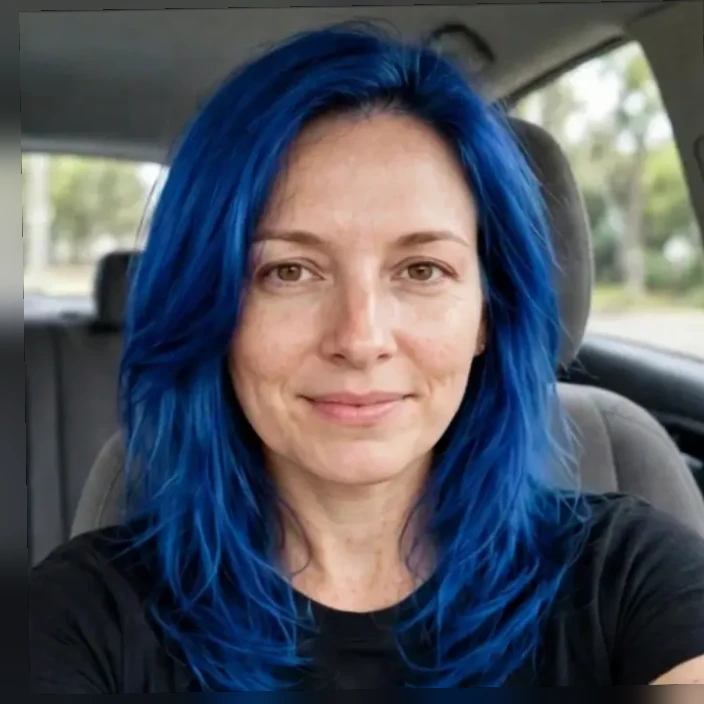
Her samples: the same fictional woman in every picture, wearing her Long Layers style — the hairstyle never changes, only the colour does, so you can see each colour clearly. Photorealistic renders, not a wig or a sticker pasted on.
For him — natural shades & grey blending
Mostly natural, the way most men colour: cover it, darken it, add highlights — or blend the grey instead of fighting it. Salt & Pepper / Silver Grey is in here on purpose: grey blending is a big one for men. And on his side, the beard colour can match the hair colour, or be tried on its own — dye the beard, keep the hair, the other way round, or both together.


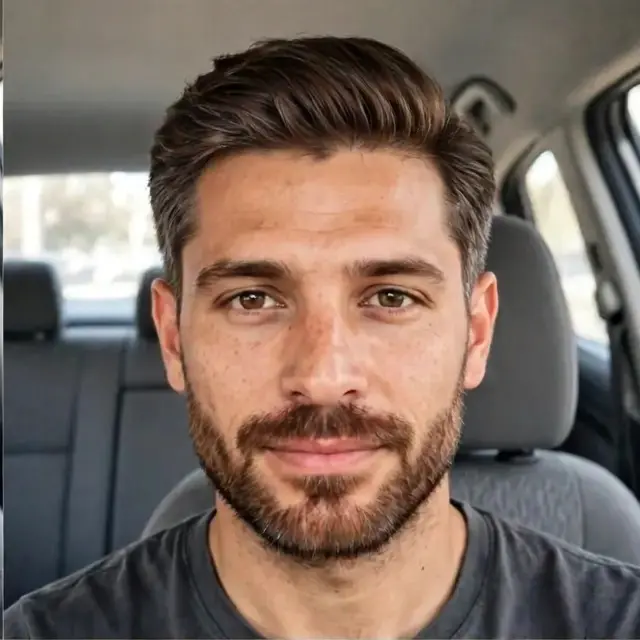


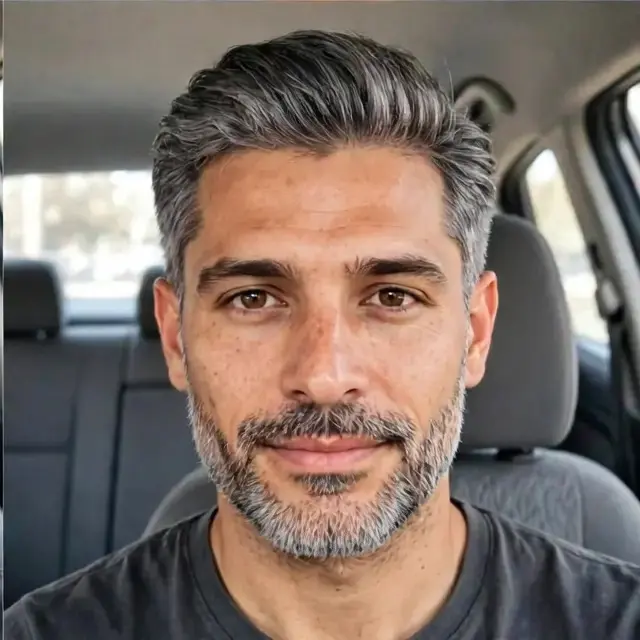
His samples: the same fictional man in every picture, same Taper Fade and same Short Boxed Beard — only the colour changes, and the beard colour matches the hair colour in every sample, right down to the grey in the Salt & Pepper. Photorealistic renders, not a wig or a sticker pasted on.
How it will work: the colour goes on the same photo as your cut and beard try-on — one look, head to chin, so you see the whole change at once. For him, the beard can take the same colour as the hair, or be coloured on its own while the hair stays natural — and grey blending can cover the beard’s grey the same way. And because it’s a picture first, a colour you hate costs you nothing — no dye, no grow-out, no fix-it appointment.
Every angle. Even the back.
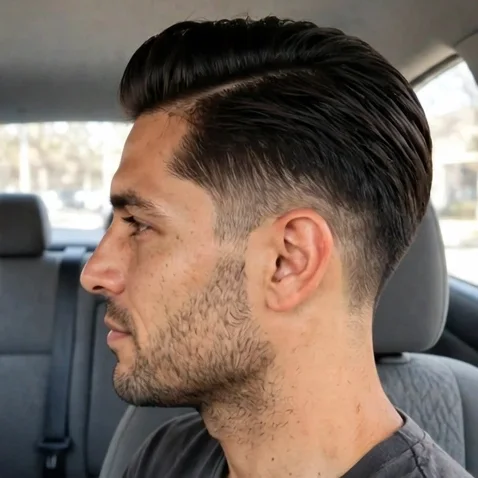
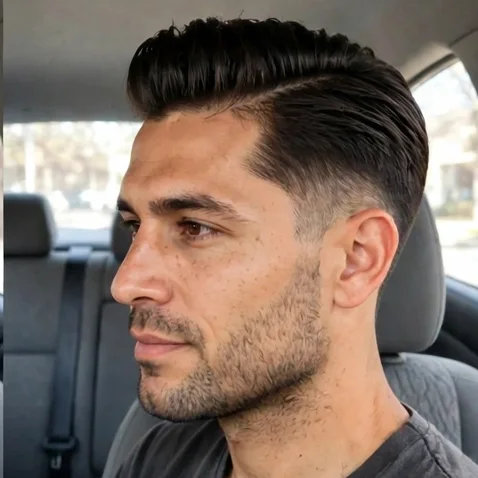
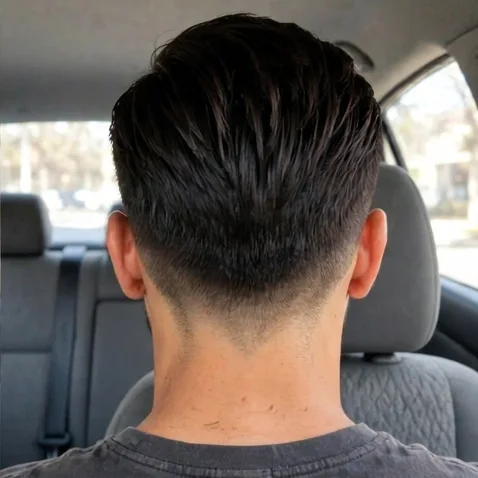
Most try-on apps stop at the front. Barber Breakthrough shows the back of your head too — because that’s half the haircut, and your barber or stylist needs to see how the cut wraps around. And every picture below has the before & after slider on it — front, sides, three-quarter and back, for him and for her. Drag the yellow line on any of them: slide right and the After takes over, slide left and the Before comes back.
For her — Long Layers, every angle
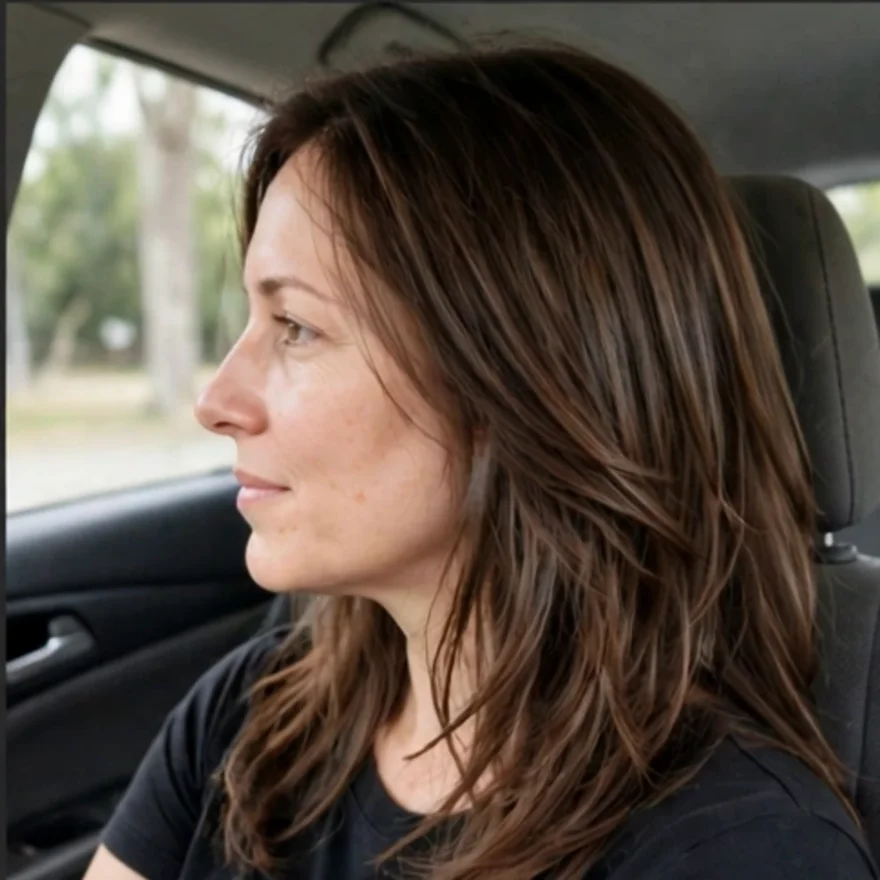
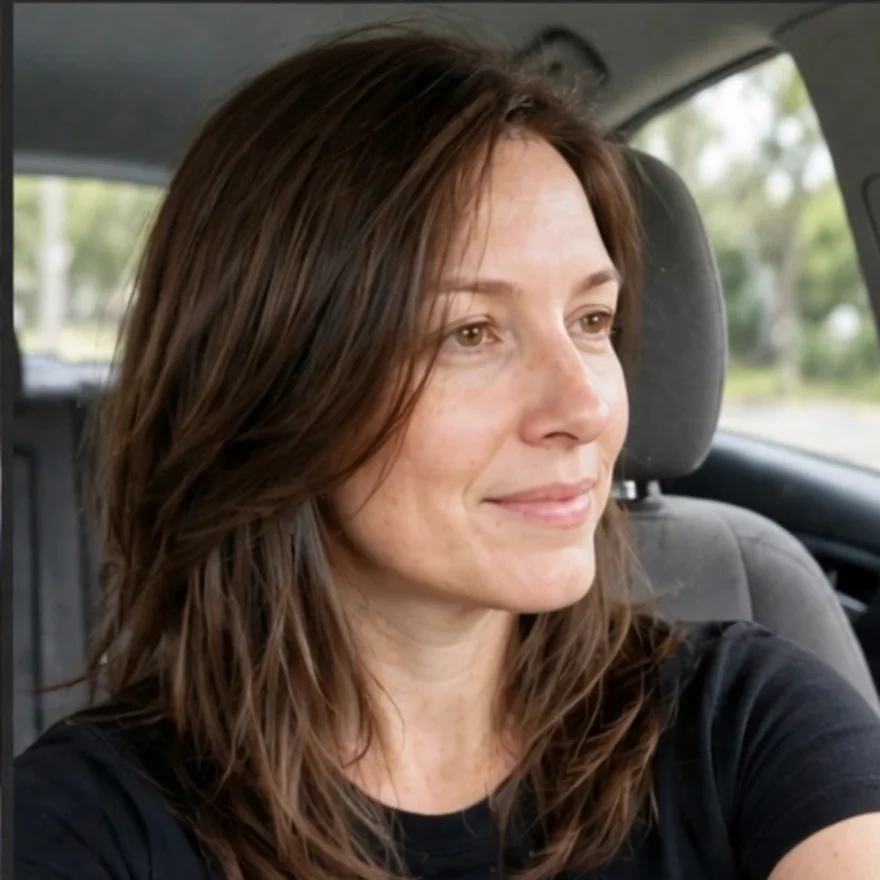
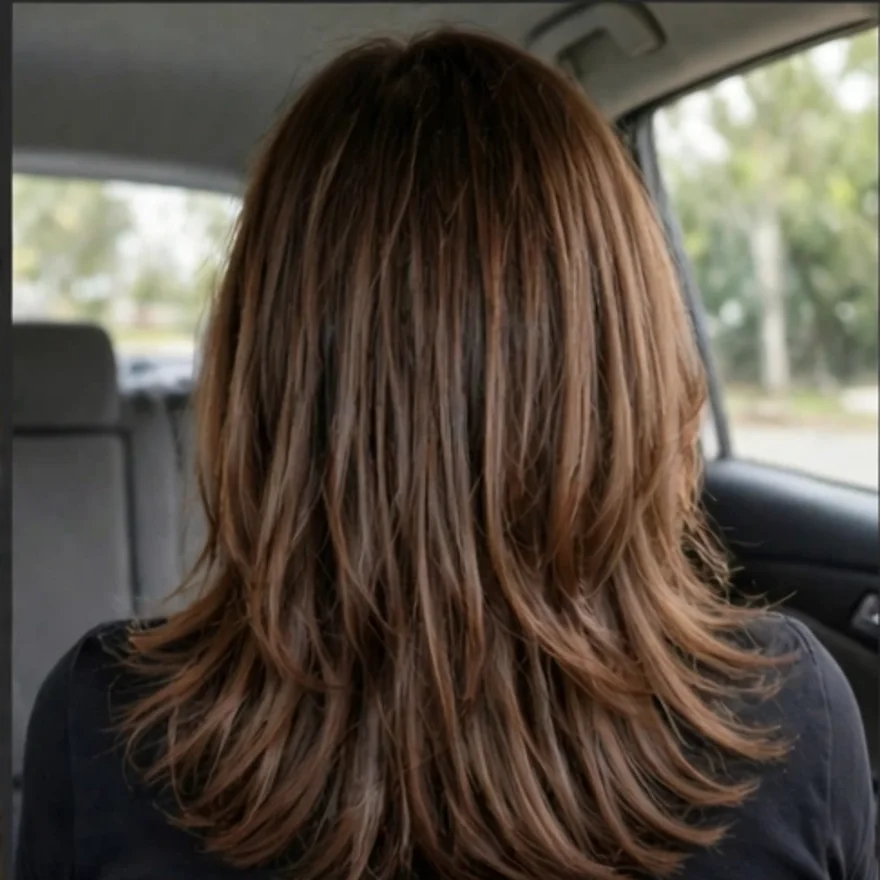
Share the look — or the before & after
Found the one? Share just the finished look, or the before-and-after side by side in a single picture. It opens your phone’s share sheet, so it can go anywhere — Facebook, Messenger, a text, any app you use.
Send it to your barber ahead of your appointment, or to the people whose opinion you actually trust.
Built for the chair — barber or salon
This wasn’t made as a beauty filter. It was made for one real moment: sitting in the chair, trying to explain a haircut with words — and the words failing.
Now there are no words to fail. There’s a picture of you, wearing the cut, with the exact name of the style on a barber or stylist card.
Why this one’s different
The other try-on apps
- ✕A wig or sticker pasted over your photo — it never really looks like you
- ✕Front view only — no sides, no back of the head
- ✕Made for beauty filters and playing dress-up
- ✕Another monthly subscription that never stops charging you
Barber Breakthrough
- ✓A photorealistic re-render of your own real face wearing the cut
- ✓Five views of every style — front, left, right, three-quarter and back
- ✓Made for men and women — the barber chair and the salon chair — with a card that names the cut
- ✓Beards too — six styles shown front, under the chin, and from both sides, with their own beard card
- ✓Hair colour too — 11 realistic shades for her including Silver Fox grey and the fashion colours, and 6 natural shades for him with grey blending and beard colour matching
- ✓First try free, then $9.99 for a pack of 100 credits — 1 credit = 1 try-on of your own photo, no subscription, and credits never expire
Website today. App tomorrow.
Yes — starting as a website doesn’t close any doors. It opens them. The same Barber Breakthrough that runs here can live on your phone like an app now, and go into the app stores next.
It works on any phone, right now
A website needs no download and no store approval. Open it in your phone’s browser and it works — camera, styles, angles, share and all.
Put it on your home screen
Save it to your home screen and it sits there with its own icon, opening full-screen just like an app. It takes about ten seconds:
On iPhone (Safari)
- Tap the Share button — the square with the arrow pointing up.
- Scroll down and tap Add to Home Screen.
- Tap Add — the icon lands on your home screen.
On Android (Chrome)
- Tap the ⋮ menu in the top corner.
- Tap Add to Home screen (or Install app).
- Tap Add to confirm — done.
Then sell it as an app
When it’s ready, the same build can be packaged for Google Play and the App Store with the same deal — first try free, then $9.99 credit packs, no subscription — the website stays as the front door that brings people in.
Pricing — simple and honest
Your first try is free — one per person, tied to your email so closing the browser doesn’t reset it. After that it’s $9.99 for a pack of 100 credits — 1 credit = 1 try-on of your own photo. Credits never expire. No subscription, no monthly bill renting you your own face back. Browsing the samples is always free.
Try it on your own photo once for free when the own-photo try-on opens. If you like it, $9.99 buys you a pack of 100 credits to keep trying looks — paid up front, no subscription.
- ✓1 free try per person on your own photo — tied to your email and checked on our end before it runs, so closing or reopening the browser doesn’t reset it. No card needed for the free one
- ✓100 credits for $9.99 — 1 credit = 1 try-on (one photo in, one new look out)
- ✓Credits never expire — no use-by date, no monthly drain. Buy a pack and use your credits whenever you’re ready
- ✓Browsing samples is always free — a credit is only used when you run your own photo, never for looking at the examples
- ✓All 12 starting styles — six for him, six for her — in five views each: front, left, right, three-quarter and back
- ✓Beards for him — six beard styles (Short Stubble, Short Boxed, Full Beard, Goatee, Van Dyke, Ducktail) in four views each: front, under the chin, right side and left side, with a beard card for your barber
- ✓Hair colour samples — live on the page now: 11 colours for her (including Silver Fox silver grey, plus Pink, Purple and Blue) and 6 for him (including Salt & Pepper grey blending, with beard colour matching) — trying a colour on your own photo comes with the own-photo engine, coming soon
- ✓Before & after slider, barber / stylist card, share and save your looks, and the His & Hers together picture
- ✓No subscription required — buy a pack, use your credits as you go
- ✓When credits run out, it simply pauses — the try-on stops until you buy another $9.99 pack. No running bill, because your pack was paid up front
How the free try & credits work
1. Browse free, always — flip through every sample look on this page as much as you want. Looking never costs a credit.
2. Upload your photo and run your free try — one straight-on selfie, right where the sample try-on sits at the top of this page. You enter your email to claim it, and we check that email on our end before the picture runs — one free try per person, so it stays used even if you close the browser, come back later, or switch devices with the same email. Your first own-photo try-on costs you nothing, no card needed.
3. Keep going with a credit pack — if that first look sells you, $9.99 buys a pack of 100 credits. Checkout runs through Gumroad — pay by card or PayPal, no Gumroad account needed. Gumroad emails you a receipt with your own credit code in it.
4. Turn that code into credits — come back to this page, paste your code into the Redeem box right below, and your balance loads with 100 credits. Each try-on of your own photo uses 1 credit. Credits never expire, so there’s no rush and no use-by date — use them at your own pace. When the 100 are gone, the try-on pauses until you buy another pack and redeem its new code — you only ever pay up front for the pack you choose.
Where things stand today: the live samples on this page are free to play with right now. The own-photo try-on — the one the free try and the credit packs apply to — isn’t connected yet and is coming soon. Join the launch list below and you’ll hear the moment it opens.
Your photo stays yours — that’s a promise
Your photo is only used to make your looks — never sold, never posted, never used in ads, and we don’t keep it or share it. It goes to the photo engine that builds your hairstyle pictures, and that’s the only place it goes. Nobody here takes your pictures, and the only person who ever shares one of your looks is you, from your own phone.
The faces in the samples on this page are fictional models, not customers — and the own-photo try-on isn’t connected yet, so no photo is collected on this page today.
Bought a pack? Here’s your credits
Buying the pack and getting the credits are two quick steps. You pay on Gumroad, Gumroad gives you a code, and you trade that code in right here on this page for your 100 credits. Here it is, start to finish:
Buy the pack
Tap Buy and checkout opens on Gumroad — the service that runs the sale. Pay with a card or with PayPal. You don’t need a Gumroad account, and Gumroad never shows on your credits — it just takes the payment.
Get your code
The moment you pay, Gumroad shows your personal credit code on the confirmation page and emails it to you with your receipt. Keep that email — that code is your 100 credits, in code form.
Paste it in below
Come back to this page, paste your code into the Redeem box below, and tap Add My 100 Credits. One code loads one full pack — 100 credits, all at once.
Your balance shows 100
Your credit balance jumps to 100 and you’re ready. Every try-on of your own photo uses 1 credit and the balance counts down. Credits never expire — and when you run out, buy another pack and redeem its new code the same way to top back up.
Redeem your code
Bought a 100-credit pack on Gumroad? This is where it turns into credits you can spend. Paste the code from your Gumroad receipt email — the one from your confirmation page works too, it’s the same code.
Your first try is still free and separate — no code needed for that one. A code is only for loading a paid pack.
Can’t find your code? Check the email Gumroad sent right after you paid — it’s in the receipt — and check your spam folder too. It’s also on the Gumroad confirmation page you saw after checkout. Each code can be loaded once. Want to see how this box works before launch? Type the practice code PRACTICE-100 and tap the button.
Where things stand today: the credit packs and the own-photo try-on open at launch, so no codes are being sold yet. This redeem box is live on this page as a working preview — it tracks your balance for this visit only, so you can walk through exactly how your credits will arrive. At launch, this same box checks your Gumroad code for real before it adds the 100.
Coming soon — the Barber Pass
Your favorite barber shouldn’t have to guess — about your cut or your credits. The Barber Pass puts your look and your credit balance on one pass on your phone, so when you sit down in the chair, your barber can see exactly where you stand.
Your barber sees your credits. You stay in control.
Here’s the idea: you save your favorite barber, and Barber Breakthrough makes you a Barber Pass — your chosen look, your barber card, and your credit balance, all on one screen. At the shop, your barber scans the code on your pass and sees it for himself: the cut you want, and how many credits you’ve got.
- Save your barber. Pick the barber or stylist you actually go to, and your pass is made for them — your look, your card, your balance.
- Show your pass in the chair. Your barber scans the code and sees your barber card and your credit balance — view only. No more “how many tries do you have left?” — it’s right there.
- Try another look together. Want to test one more style before the clippers start? Run it right there in the shop — it uses 1 credit, the same as always, and your barber watches the balance update with you.
One thing stays the same: credits are for try-ons — pictures of new looks — not for paying for the haircut itself. Your barber can see your balance, but he can’t spend it, move it, or charge it. Only you use your credits, and only on your own photo.
Where things stand today: the Barber Pass is Coming Soon — it isn’t live yet, and there’s nothing to scan today. It builds on the barber card and the credit balance already on this page. Join the launch list and you’ll hear when your pass is ready.
Straight answers
Is that really my face, or a model?
Really yours. You take or upload one photo of yourself, and the software re-renders that photo wearing each hairstyle — your face, your features, cleaned up in the new cut. The photos on this page are the live samples, each built from one starting photo the same way yours will be.
Can I see the back of my head?
Yes — every style comes in five views: front, left side, right side, three-quarter, and back. The back view is rendered to match each cut’s fade pattern, so your barber can see how it should wrap and finish at the neckline.
How do I show my barber or stylist?
Every look comes with a barber or stylist card: the exact name of the cut, what to do on top and on the sides (or the length and finish, for the women’s styles), and a plain-words line to say out loud — plus the photos from every angle. Show the phone, and there’s nothing left to guess.
Is it for women too?
Yes. The women’s sample on this page works exactly like the men’s: one photo, six styles — Long Layers, Classic Bob, Pixie Cut, Curtain Bangs, Soft Waves, and Sleek and Straight — five views of each, a before & after slider, and a stylist card that names the cut. In the full version, your own photo gets the same treatment.
Can we try it together as a couple?
Yes — that’s the His & Hers option in the Better Together sample on this page. Tap His & Hers, he takes or adds his photo first and picks his cut, then she takes or adds her photo and picks her style, and the app puts both together into one combined picture with both new looks in it at once — his Taper Fade and her Long Layers in the sample above. Slide the before & after across the one picture, then share it or save it like any other look. For visitors’ own photos, His & Hers is Coming Soon — the sample walkthrough shows exactly how it will work.
Can I try a beard too?
Yes — beards are in. There are six beard styles for him, to match the six men’s cuts: Short Stubble, Short Boxed Beard (short and neat), Full Beard, Goatee, Van Dyke, and Ducktail. Every beard is shown in four straightforward views — straight-on from the front, under the chin, the right side of the face, and the left side — and every beard comes with a beard card for your barber: the style name, the length and shape, the cheek and neck lines, and a plain-words line to say out loud. The beard samples are live on this page now; trying a beard on your own photo comes with the own-photo try-on, which isn’t connected yet.
Can I try a new hair colour?
Yes — the colour samples are live on this page now, done the same way as the cuts: the same fictional sample faces, the same hairstyles, with only the colour changed, so every shade is a realistic, honest comparison. For her there are 11: Jet Black, Dark Brown, Chocolate Brown, Honey Blonde, Platinum Blonde, Silver Fox (a soft silver grey), Copper/Auburn Red, Burgundy, plus the fashion colours Pink, Purple and Blue. For him there are 6, mostly natural: Jet Black, Dark Brown, Medium Brown, Blonde Highlights, Auburn, and Salt & Pepper / Silver Grey — grey blending and grey coverage are big ones for men — with the beard colour matching the hair, or tryable on its own. Trying a colour on your own photo, together with your cut (and your beard), arrives with the own-photo engine — that part isn’t connected yet, so today the colours are live samples, not something you can run on your own photo.
Can I share my look?
Yes — share the finished look on its own, or a before-and-after picture with both in one image. Sharing uses your phone’s share sheet, so it can go to Facebook, Messenger, text messages, or any other app you have.
How much does it cost?
Your first try on your own photo is free — one per person, tied to your email and checked before it runs, so it can’t be reset by closing the browser. No card needed for that one. After that it’s $9.99 for a pack of 100 credits. 1 credit = 1 try-on — one photo in, one new look out. Credits never expire — there’s no use-by date, so you can use them at your own pace. Browsing the sample looks on this site is always free; a credit is only used when you run your own photo. When your credits run out, the try-on simply pauses until you buy another pack.
When you buy a pack, checkout runs through Gumroad (card or PayPal) and Gumroad emails you a code — you paste that code into the Redeem box on this page and your 100 credits load. The own-photo try-on isn’t connected yet, so there’s nothing to buy today — the free try and the credit packs apply when it opens.
Can I get another free try if I close the browser and come back?
No — and that’s on purpose, because every try-on costs money to run. Your free try is one per person, not one per visit.
When you claim it, you enter your email and we check it on our end before your photo runs. That record stays, so closing your computer, clearing the tab, reopening the site, or using a different browser doesn’t reset it. We also use your device and connection as a backup check, and using the same email on your phone counts as the same person.
If you’ve already used your free try, the next try-on simply uses 1 credit from a pack — $9.99 for 100 credits, and credits never expire. Browsing all the sample looks on this page stays free either way.
Can my barber see my credits?
Soon — that’s the Barber Pass, and it’s Coming Soon. You’ll save your favorite barber and get a pass on your phone with your look, your barber card, and your credit balance on it. At the shop, your barber scans the code on the pass and sees your balance — view only.
He can’t spend your credits, move them, or charge them, and credits never pay for the haircut itself — they’re only for try-ons of your own photo, 1 credit per look. The pass just means the two of you can see where you stand, and if you want to try one more look together in the chair, you’ll watch the same balance count down. It isn’t live yet — join the launch list and you’ll hear when it opens.
Is it a subscription?
No — no subscription required. Your first try is free, then you buy credit packs as you need them: $9.99 for 100 credits, 1 credit per try-on of your own photo, and credits never expire. That’s deliberate: the big try-on apps rent you your own face back every month, and this one won’t. When your credits run out it just pauses — buy another pack when you’re ready, or don’t. Nothing keeps charging you.
Do my credits expire?
No — credits never expire. Buy a pack of 100 for $9.99 and use them whenever you’re ready: this week, next month, or next year. There’s no use-by date and nothing quietly drains them — a credit only leaves your balance when you run a try-on of your own photo.
How do I get my credits after I buy on Gumroad?
Three quick steps. 1. When you pay, Gumroad shows your personal credit code on the confirmation page and emails it to you with your receipt. 2. Come back to this page and paste that code into the Redeem box in the “Get your credits” section. 3. Tap “Add My 100 Credits” — your balance loads with the full 100 at once, ready to spend, 1 credit per try-on of your own photo.
You pay on Gumroad, but your credits live here — Gumroad is just the checkout. You don’t need a Gumroad account to buy, and you can pay there with a card or with PayPal.
Where do I find my code, and what if I lose it?
Your code is in two places: on the Gumroad confirmation page right after you pay, and in the receipt email Gumroad sends you — check your spam folder if it isn’t in your inbox. Keep that email; it’s your proof of the pack. Each code loads one pack of 100 credits and can only be redeemed once. When you buy another pack later, it comes with a brand-new code — redeem that one the same way to top your balance back up.
If it starts as a website, can it still become a phone app I can sell?
Yes. The website runs on any phone today and can be added to a home screen like an app. The same build can then be packaged for the app stores — Google Play first — and sold there, with this website staying live as its home on the web.
What happens to my photo?
Your photo stays yours. It’s only used to make your looks — never sold, never posted, never used in ads, and we don’t keep it or share it. Your photo goes to the photo engine that builds your hairstyle pictures, and that’s the only place it goes. Nobody here takes your pictures.
The faces on this page are fictional sample models, not customers — no visitor’s photo is collected, uploaded, or shown here today, because the own-photo try-on isn’t connected yet. When it opens, the looks you choose to share are shared by you, from your own phone — that part is always in your hands.
What kind of photo works best?
A plain, straight-on selfie in good light: face the window, hold the phone at eye level, keep the top of your head and both ears in the frame, hats off and no filters. The full checklist is in the “Get a photo that works” section above.
When can I get it?
The samples you’re trying on this page are live now — every style, angle, and the His & Hers walkthrough, all free to browse. The full version — your own photo in every style — is still in the works and isn’t connected yet. When it launches here, your first own-photo try is free, then it’s $9.99 for a pack of 100 credits (1 credit = 1 try-on). The launch list below is how you’ll hear about it first.
Get notified when Barber Breakthrough launches
The samples on this page are live right now. The full version — your own photo in every style — is still being built — join the launch list and you’ll hear the moment it opens, first. Your address is only used for launch news about Barber Breakthrough: no spam, and it isn’t sold or shared.
How joining works: tapping Join opens your email app with a short note already addressed to us and your email filled in — just hit Send, and your signup lands straight in our inbox. Rather write it yourself? Email lilyoheys2015@gmail.com with the subject “Barber Breakthrough launch list.”
Your next cut, decided before you sit down.
One photo. One tap. Every angle. Walk in knowing exactly what you’re getting — and walk out wearing it.
Try the sample again ↑ Join the launch list